Automating EC2 Recovery with AWS Lambda and EventBridge
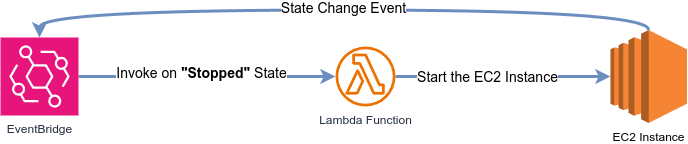
When managing cloud infrastructure, automating responses to common events can save time, reduce downtime, and ensure consistent operations. In this post, we’ll walk through a CloudFormation template that deploys an EC2 instance, a Lambda function, and an EventBridge rule to automatically restart a stopped instance.
1. The Networking Layer
The template starts by building a VPC, subnet, and routing to host the EC2 instance. Here’s the networking setup:
# VPC and Internet Gateway
VPC:
  Type: AWS::EC2::VPC
  Properties:
    CidrBlock: 10.10.0.0/16
    EnableDnsSupport: true
    EnableDnsHostnames: true
    Tags:
      - Key: Name
        Value: !Sub "${AWS::StackName}-VPC"

InternetGateway:
  Type: AWS::EC2::InternetGateway
  Properties:
    Tags:
      - Key: Name
        Value: !Sub "${AWS::StackName}-IGW"

# Public Subnet and Routing
PublicSubnet:
  Type: AWS::EC2::Subnet
  Properties:
    VpcId: !Ref VPC
    CidrBlock: 10.10.0.0/24
    AvailabilityZone: !Select [ 0, !GetAZs "" ]
    MapPublicIpOnLaunch: true
    Tags:
      - Key: Name
        Value: !Sub "${AWS::StackName}-PublicSubnet"

Route:
  Type: AWS::EC2::Route
  DependsOn: AttachGateway
  Properties:
    RouteTableId: !Ref RouteTable
    DestinationCidrBlock: 0.0.0.0/0
    GatewayId: !Ref InternetGateway
This creates a VPC with a public subnet, internet gateway, and route to ensure the EC2 instance can communicate with the internet.
2. The EC2 Instance
The EC2 instance is configured with a security group allowing HTTP/SSH access and a startup script to install Apache:
MyEC2Instance:
  Type: AWS::EC2::Instance
  DependsOn: AttachRouteTable
  Properties:
    InstanceType: !Ref EC2InstanceType
    KeyName: !Ref KeyName
    ImageId: !Ref ImageId
    SecurityGroupIds:
      - !GetAtt MyEC2SecurityGroup.GroupId
    SubnetId: !Ref PublicSubnet
    UserData:
      Fn::Base64: |
        #!/bin/bash -xe
        yum update -y
        yum install -y httpd
        systemctl start httpd
        systemctl enable httpd
        echo "<html><body><h1>Hello World</h1></body></html>" > /var/www/html/index.html
The UserData script automates the setup of a basic web server. Note the KeyName parameter—this must match an existing EC2 key pair in your account.
3. The Lambda Function
A Lambda function is defined to restart the EC2 instance. Its IAM role grants minimal permissions to start only the designated instance:
LambdaExecutionRole:
  Type: AWS::IAM::Role
  Properties:
    AssumeRolePolicyDocument:
      Version: "2012-10-17"
      Statement:
        - Effect: Allow
          Principal:
            Service: lambda.amazonaws.com
          Action: sts:AssumeRole
    Policies:
      - PolicyName: LambdaExecutionPolicy
        PolicyDocument:
          Version: "2012-10-17"
          Statement:
            - Effect: Allow
              Action: ec2:StartInstances
              Resource: !Sub "arn:${AWS::Partition}:ec2:${AWS::Region}:${AWS::AccountId}:instance/${MyEC2Instance}"

LambdaFunction:
  Type: AWS::Lambda::Function
  Properties:
    Handler: index.handler
    Role: !GetAtt LambdaExecutionRole.Arn
    Code:
      ZipFile: |
        import boto3
        def handler(event, context):
            ec2 = boto3.client('ec2')
            instance_id = event['detail']['instance-id']
            ec2.start_instances(InstanceIds=[instance_id])
    Runtime: python3.9
    Timeout: 30
The LambdaExecutionRole limits permissions using !Sub "arn:.../${MyEC2Instance}", ensuring least privilege.
4. The EventBridge Rule
An EventBridge rule detects when the instance stops and triggers the Lambda:
DetectStoppedInstanceRule:
  Type: AWS::Events::Rule
  Properties:
    Description: Detect stopped instance
    State: ENABLED
    EventPattern:
      source:
        - aws.ec2
      detail-type:
        - EC2 Instance State-change Notification
      detail:
        state:
          - stopped
        instance-id:
          - !Ref MyEC2Instance
    Targets:
      - Arn: !GetAtt LambdaFunction.Arn
        Id: StartInstance
This rule listens for EC2 state changes and forwards matching events to the Lambda.
5. The Critical Permission
Why is PermissionForEventsToInvokeLambda required?
AWS services like EventBridge can’t invoke Lambda functions by default. Without this resource, the EventBridge rule would lack permission to trigger the Lambda:
PermissionForEventsToInvokeLambda:
  Type: AWS::Lambda::Permission
  Properties:
    FunctionName: !GetAtt LambdaFunction.Arn
    Action: lambda:InvokeFunction
    Principal: events.amazonaws.com  # Grants EventBridge permission
    SourceArn: !GetAtt DetectStoppedInstanceRule.Arn  # Restricts to this rule
This permission:
- Allows only the specified EventBridge rule (
SourceArn) to invoke the Lambda. - Uses
events.amazonaws.comas the trusted principal. - Is mandatory—omitting it will break the automation.
6. Testing the Automation
After deploying the cloudformation template, let’s test the workflow! Here’s how to manually stop the EC2 instance and verify it restarts automatically:
Step 1: Stop the Instance
- Via the AWS Console:
- Navigate to the EC2 Dashboard.
- Select your instance (named after your CloudFormation stack).
- Click Instance State > Stop Instance.
OR
- Via AWS CLI:
aws ec2 stop-instances --instance-ids <YOUR_INSTANCE_ID> --region <YOUR_REGION>
Step 2: Monitor the State Change
-
In the EC2 Console:
The instance will transition fromstopping➔stopped. Within 1-2 minutes, EventBridge detects this state change and triggers the Lambda function. -
Check Lambda Logs:
Open the Lambda function in the AWS Console and navigate to the Monitor tab. Look for recent invocations in CloudWatch Logs. You should see logs confirming the Lambda received the event and attempted to start the instance.
Step 3: Verify the Instance Restarts
After a few moments:
- The instance state will change from
stopped➔pending➔running. - The public IP may change (this is normal for EC2 instances stopped/started in a default VPC).
Full CloudFormation Template
Below is the complete template for easy copy-pasting:
Parameters:
  EC2InstanceType:
    Type: String
    Default: t2.micro
    Description: EC2 instance type
  KeyName:
    Type: String
    Description: Name of an existing EC2 KeyPair to enable SSH access
    Default: MyMainKey  # Replace with your key pair name!
  ImageId:
    Type: AWS::SSM::Parameter::Value<AWS::EC2::Image::Id>
    Description: Image ID
    Default: /aws/service/ami-amazon-linux-latest/amzn2-ami-hvm-x86_64-gp2

Resources:
  # Networking
  VPC:
    Type: AWS::EC2::VPC
    Properties:
      CidrBlock: 10.10.0.0/16
      EnableDnsSupport: true
      EnableDnsHostnames: true
      Tags:
        - Key: Name
          Value: !Sub "${AWS::StackName}-VPC"

  InternetGateway:
    Type: AWS::EC2::InternetGateway
    Properties:
      Tags:
        - Key: Name
          Value: !Sub "${AWS::StackName}-IGW"

  AttachGateway:
    Type: AWS::EC2::VPCGatewayAttachment
    Properties:
      VpcId: !Ref VPC
      InternetGatewayId: !Ref InternetGateway

  PublicSubnet:
    Type: AWS::EC2::Subnet
    Properties:
      VpcId: !Ref VPC
      CidrBlock: 10.10.0.0/24
      AvailabilityZone: !Select [ 0, !GetAZs "" ]
      MapPublicIpOnLaunch: true
      Tags:
        - Key: Name
          Value: !Sub "${AWS::StackName}-PublicSubnet"

  RouteTable:
    Type: AWS::EC2::RouteTable
    Properties:
      VpcId: !Ref VPC
      Tags:
        - Key: Name
          Value: !Sub "${AWS::StackName}-RT"

  Route:
    Type: AWS::EC2::Route
    DependsOn: AttachGateway
    Properties:
      RouteTableId: !Ref RouteTable
      DestinationCidrBlock: 0.0.0.0/0
      GatewayId: !Ref InternetGateway

  AttachRouteTable:
    Type: AWS::EC2::SubnetRouteTableAssociation
    Properties:
      SubnetId: !Ref PublicSubnet
      RouteTableId: !Ref RouteTable

  # Security Group
  MyEC2SecurityGroup:
    Type: AWS::EC2::SecurityGroup
    Properties:
      GroupDescription: Enable HTTP and SSH access
      VpcId: !Ref VPC
      SecurityGroupIngress:
        - IpProtocol: tcp
          FromPort: '80'
          ToPort: '80'
          CidrIp: '0.0.0.0/0'
        - IpProtocol: tcp
          FromPort: '22'
          ToPort: '22'
          CidrIp: '0.0.0.0/0'

  # EC2 Instance
  MyEC2Instance:
    Type: AWS::EC2::Instance
    DependsOn: AttachRouteTable
    Properties:
      InstanceType: !Ref EC2InstanceType
      KeyName: !Ref KeyName
      ImageId: !Ref ImageId
      SecurityGroupIds:
        - !GetAtt MyEC2SecurityGroup.GroupId
      SubnetId: !Ref PublicSubnet
      UserData:
        Fn::Base64: |
          #!/bin/bash -xe
          yum update -y
          yum install -y httpd
          systemctl start httpd
          systemctl enable httpd
          echo "<html><body><h1>Hello World</h1></body></html>" > /var/www/html/index.html

  # Lambda
  LambdaExecutionRole:
    Type: AWS::IAM::Role
    Properties:
      AssumeRolePolicyDocument:
        Version: "2012-10-17"
        Statement:
          - Effect: Allow
            Principal:
              Service: lambda.amazonaws.com
            Action: sts:AssumeRole
      Policies:
        - PolicyName: LambdaExecutionPolicy
          PolicyDocument:
            Version: "2012-10-17"
            Statement:
              - Effect: Allow
                Action: ec2:StartInstances
                Resource: !Sub "arn:${AWS::Partition}:ec2:${AWS::Region}:${AWS::AccountId}:instance/${MyEC2Instance}"

  LambdaFunction:
    Type: AWS::Lambda::Function
    Properties:
      Handler: index.handler
      Role: !GetAtt LambdaExecutionRole.Arn
      Code:
        ZipFile: |
          import boto3
          def handler(event, context):
              ec2 = boto3.client('ec2')
              instance_id = event['detail']['instance-id']
              ec2.start_instances(InstanceIds=[instance_id])
      Runtime: python3.9
      Timeout: 30

  # EventBridge
  DetectStoppedInstanceRule:
    Type: AWS::Events::Rule
    Properties:
      Description: Detect stopped instance
      State: ENABLED
      EventPattern:
        source:
          - aws.ec2
        detail-type:
          - EC2 Instance State-change Notification
        detail:
          state:
            - stopped
          instance-id:
            - !Ref MyEC2Instance
      Targets:
        - Arn: !GetAtt LambdaFunction.Arn
          Id: StartInstance

  PermissionForEventsToInvokeLambda:
    Type: AWS::Lambda::Permission
    Properties:
      FunctionName: !GetAtt LambdaFunction.Arn
      Action: lambda:InvokeFunction
      Principal: events.amazonaws.com
      SourceArn: !GetAtt DetectStoppedInstanceRule.Arn